SharePoint 2010 migration to SharePoint Online
The CityUWiki, a collaborative platform based on Microsoft SharePoint 2010 has been launched for almost 10 years. Today, there are over 100 sites hosting on this platform. Users have enjoyed the advantage of using it for document management, shared calendar of resource bookings, etc. In order to provide better mobile support and full integration with Office Web Apps, the SharePoint Online service (i.e. a cloud-based version of SharePoint) was introduced in 2015 .
The current CityUWiki server cluster has been used for several years and it is time to upgrade it to a newer platform. Currently, the SharePoint Online is well adopted by users and the Computing Services Centre (CSC) is hosting around 50 sites there. To synergize, we decided to migrate the CityUWiki to SharePoint Online, from which users not only can enjoy the new features of the latest version of SharePoint but also a larger storage size, Information Rights Management (IRM) protection, and integration with other Office 365 applications.
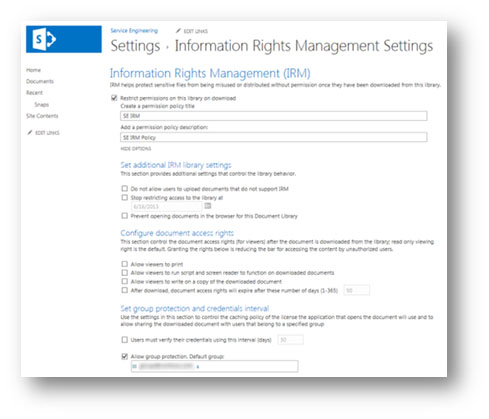
Information Rights Management (IRM) Protection
Most of the SharePoint users are using SharePoint for document management. They are sharing documents among members within the department as well as committees with proper setting of access control. For site owners who want to fine-grain the access control of the files, it can be achieved by enabling the IRM in the document library. All files under the IRM-protected library can be set as read-only, i.e. it prohibits viewers from copying file content, saving a local copy or printing them out. With IRM, the access control will still be applied to an individual file in the document library even when it is downloaded to the users’ PCs.
Beyond SharePoint
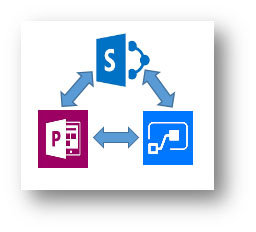
As SharePoint Online is one of the Microsoft’s cloud-based services, it is easy to integrate with other cloud-based products (e.g. PowerApps and Microsoft Flow), to enhance user experience. Using the PowerApps, users can build business apps without coding, while Microsoft Flow can enable users to create workflows for automation.
Migration Plan
SharePoint offers many features and allows users to customize their sites. However, sites that are using obsoleted features or with customizations may not migrate properly to the newer version when using the standard migration tool, hence making the migration of SharePoint sites challenging.
To ensure a smooth migration, a third-party migration tool has been acquired to help users to migrate their site contents, access controls and workflows. However, since the architecture and user interface of SharePoint Online is different from SharePoint 2010, legacy web parts, customized codes and layouts, sandboxed solution that are not supported on SharePoint Online, will have to be re-created in the new platform manually.
In 2018, the CSC will work closely with site owners to facilitate their site migration to SharePoint Online so that they can continue to enjoy the advantages in using the new SharePoint platform.