What’s New in SharePoint 2013?
The CityUWiki was first introduced in June 2008. It is a document management and collaboration platform based on Microsoft SharePoint 2010. The usage of CityUWiki grew from 10 sites initially to over 100 sites as of today. It supports various departments, committees and project teams for closed-group collaboration. Recently, Microsoft released the new version of SharePoint - SharePoint 2013. In this release, many improved features and interfaces have been added to facilitate mobile devices usage. SharePoint 2013 is also made available in the form of Cloud Services.
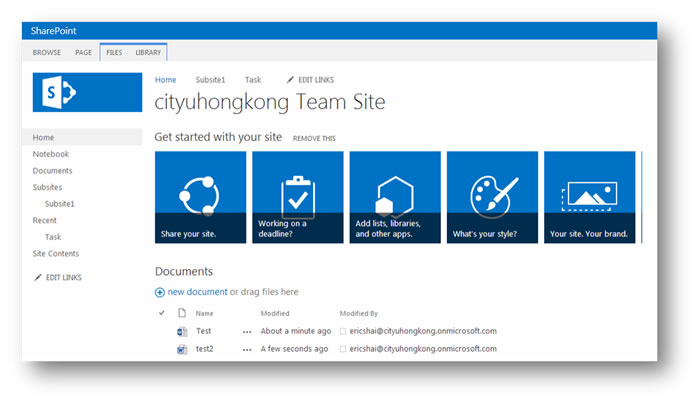
SharePoint 2013 brings a new look when compared to the previous versions. Like Windows 8, Windows phone and all the other Microsoft Office 2013 applications, SharePoint 2013 has a new sleek, “metro-style” design. This simplified design uses tiles and typography to deliver information, which makes it especially easy to navigate in mobiles and tablets. In this article, we shall look at some of the new features found in this version:
Mobile Support
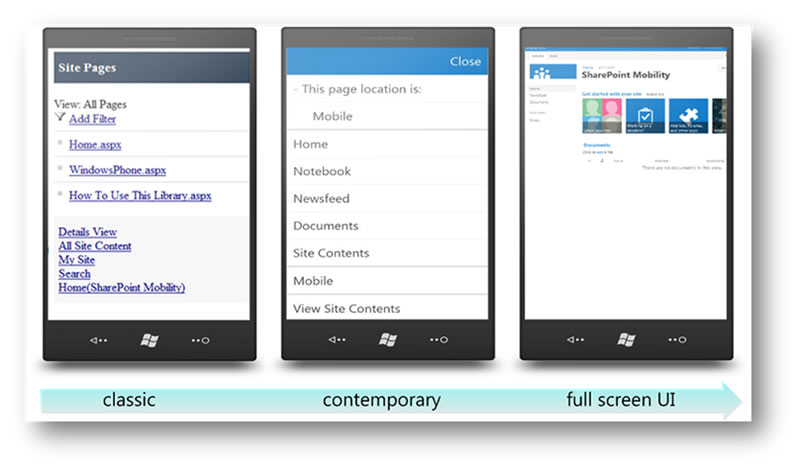
In the previous version of SharePoint, one major complaint from users is using SharePoint on mobile devices as it only provides a simple text-based interface for users to navigate their sites. As good mobile support is crucial for web applications today, SharePoint 2013 offers a contemporary view for mobile browser and renders in HTML5. It also allows users to switch to full desktop view easily and let users enjoy the same desktop experience with their mobile devices1.
Office Web Apps
The web-based version of the Microsoft Office which accompanied SharePoint since the last version included Word, Excel, PowerPoint and OneNote. These web applications allow users to access their documents in the SharePoint library and do a light-weight editing in the browser directly. This becomes very handy for users who use a mobile device or desktop without MS Office installed. In SharePoint 2013, there is a new Preview mode available for users to preview the MS Office document without the need to open it. Users can even navigate the document in the preview window. This nice feature is also available in the Search results page. Simply mouse over the document name and the preview window will pop up.

File Upload in Document Library
A simple but the most desirable feature in SharePoint 2013 is the ability to drag and drop files into document libraries directly via the browser without the need to open the library with Window Explorer. Users can drag a number of files from the desktop and then drop them into the browser. The files will then be uploaded to the corresponding SharePoint Library which makes saving documents extremely convenient.

Project Site
A new site template “Project Site” has been introduced in SharePoint 2013. This template allows users to effectively collaborate on projects. It looks like a SharePoint Team site with features such as documents libraries and, newsfeeds for project members to share information. In addition, a new Project Summary and Timeline web part is also included. Project members can use the web part to visualize the project progress and get alerts by the overdue tasks.

Fig. 1 Project Summary

Fig. 2 Gantt Chart
SharePoint Apps
SharePoint 2013 introduced a new feature called Apps2. Apps include the traditional components such as lists, libraries and site pages. Users can add these components from the "Your apps" page, or from “SharePoint Stores” and "App Catalog"” as if choosing a web part. Apart from the standard web part such as content editor, Apps can be a remote web application that interacts with the SharePoint environment. Most of the program logics are moved to the cloud or client computer instead of the SharePoint farm. Now, users have many choices of Apps from worldwide developers to extend the capabilities of their SharePoint site.

Upgrade Plan
The new SharePoint version offers many useful features and the Computing Services Centre (CSC) will actively consider upgrading CityUWiki to SharePoint 2013. Our experience from upgrading the SharePoint server from version 2007 to version 2010 last year is a good reference and start point. We understand that the most difficult and time consuming part was and will be the customizations done in the wiki sites. These customizations included existing layouts, web parts and workflows, etc. that cannot be upgraded / converted directly from version 2010 to version 2013 and need to be re-done in version 2013. In addition, there are also significant changes to the architecture and the access authentication in the SharePoint 2013 servers which will impact the existing site structures and access controls in place, all of which must be studied and the upgrade mechanisms be worked out before an upgrade schedule can be announced.