Has Facebook, Twitter or Instagram already become an integral part of your life? You may want to share whatever you find interesting with your friends or followers, as frequent as you can. Wouldn’t it be a good idea if you can communicate with your colleagues on business issues the same way? What if a student wants to ask a professor questions and also look for comments from other coursemates? While the above 3 social networks may be too open or informal, Yammer is the solution for these scenarios.
Yammer is a private social network that allows you to share information with your colleagues or students. Only authorized people are able to join this network, so the information is secure and only visible to them.
For instance, course coordinators can create a group specifically for the enrolled students. They can virtually meet each other even before the first lecture. The lecturer can share the objectives with the students, while the students can share their learning needs. The orientation job can be done online beforehand so that most of the class time can be devoted to the curriculum.
Yammer helps the students to learn from and share with different parties, instead of just the unidirectional learning from textbooks or professors. They can also learn among different Yammer groups through discussions and collaborations. The participants can continue to use Yammer to share valuable information and communicate anytime anywhere, even after their course formally ends. Eventually, there will be a Yammer community of the people who had previously studied or worked at the University.
Let’s get started
After you have
logged in to Office 365, you will find Yammer inside one of the programs available on clicking the top left corner of the screen.
Here are some quick tips to share:
Join a group
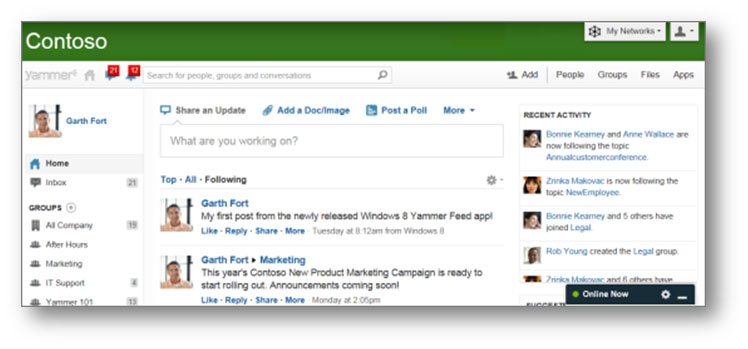
Groups are the most common way to collaborate with colleagues or students about a topic. The “All Company” group is the default group that all users will become members of once registered. There are public groups and private groups. Public groups are open to all users and can be joined at any time. Private groups can only be joined when an invitation is received. Click the “Groups” link on the top right corner of the screen to find available groups or to create a new group yourself.
Reply to a message
“Reply” is the most important function. Yammer starts a thread when you reply to a message. It is much easier to keep track of the replies from other users with a thread. Click “Reply” under the message and then type your message to reply.
“Like” someone’s message
“Like” means you had read someone’s message, agree with his/her idea, or just let him/her know you like what he/she is saying.
Follow someone
If you are interested in someone’s messages and want to see their messages in your feed, you can follow him/her. You can search for a specific user by using his/her name in the search box, or you can try to find his/her messages in the “All Company” group and then click the “Follow” button.
Check the Inbox and Notifications
The Inbox is the place where you manage your conversations that are most relevant to you inside Yammer. You will find the messages you posted, as well as the replies to your messages in the Inbox. When you are followed by someone, or your messages got “Like” by someone, you will find the corresponding notifications beside the Inbox.
CityU currently maintains two different Office 365 sites, one for students and the other for staff. Hence there are two separate Yammer instances. Staff who wish to Yammer with students can use their eid-f@staff.cityu.edu.hk account on the student (@my.cityu.edu.hk) tenant.