Canvas Adoption: From the Perspectives of Instructors and Students
Canvas by Instructure, a cloud-based Learning Management System (LMS) originated in Utah, the USA, has been fully implemented at City University of Hong Kong (CityU) for e-learning since the start of Semester B 2014/15. The Canvas for CityU is served from Singapore with a much better network latency than serving from the USA or Australia, and users are generally pleased with the system response time. Currently in CityU, Canvas is supporting 1,514 course sites, 1,389 teaching staff and over 24,000 students. It is hoped that with the following tips, users will enjoy and benefit from the intuitive interface of Canvas, as well as have a smoother learning curve for this advance application.
Personalization
Canvas allows users to have autonomy over their profile picture and bio by clicking the user’s name at the upper right (see Fig 1). Teaching staff can include their contact information, such as office location and office hours, while students can associate their profile picture to his/her contributions within Canvas. You can also browse through others' profiles provided that they are being taught by you or they are learning with you.
Canvas allows users to have autonomy over their profile picture and bio by clicking the user’s name at the upper right (see Fig 1). Teaching staff can include their contact information, such as office location and office hours, while students can associate their profile picture to his/her contributions within Canvas. You can also browse through others' profiles provided that they are being taught by you or they are learning with you.
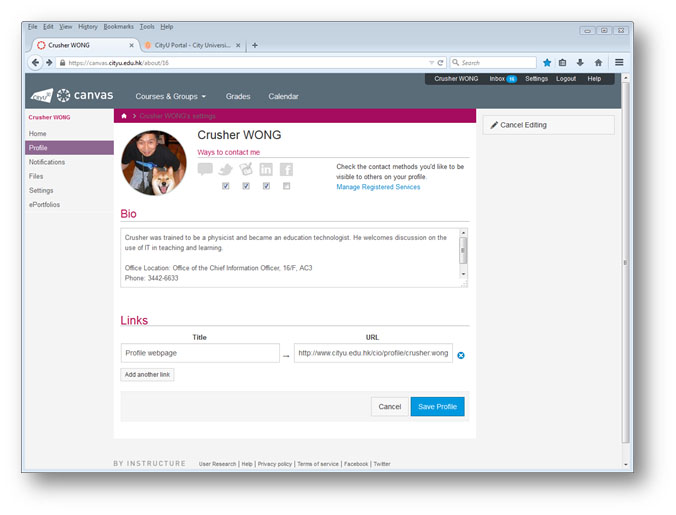
Figure 1: Editing Profile
You can add more e-mail addresses and connect Canvas to other social networking sites such as Facebook, Twitter and LinkedIn at “Settings”. As a result, others always have yet another channel to contact you and Canvas can send out notifications to multiple services. Just take a look at my “Notification” page and you will see how it works.
Notification Preferences (Fig. 2) are customizable for individual users to get informed without being bombarded by messages sent to your CityU e-mail account. For example, you may choose to receive announcement notifications on a daily basis instead of ASAP. Alternative channels, such as Facebook and your personal e-mail address, can be included to obtain notification from the system. Teachers are recommended to update the notification for “Announcement Created By You” to ASAP for immediate feedback in e-mail after posting announcements in a Canvas course. In any case, please remember that receiving notifications by CityU e-mail or other channels outside Canvas is the right of individuals and some students may opt out completely. Nevertheless, Canvas will keep students informed via internal means such as the global stream, the course stream and the to-do list. Using Class List on AIMS is an ideal way for teachers to disseminate mass messages via CityU e-mail system to all the students registered in a course.
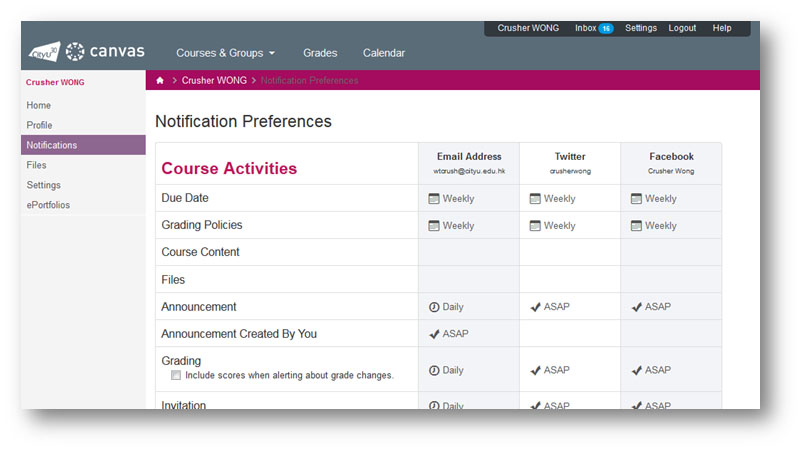
Figure 2: Notification Preference
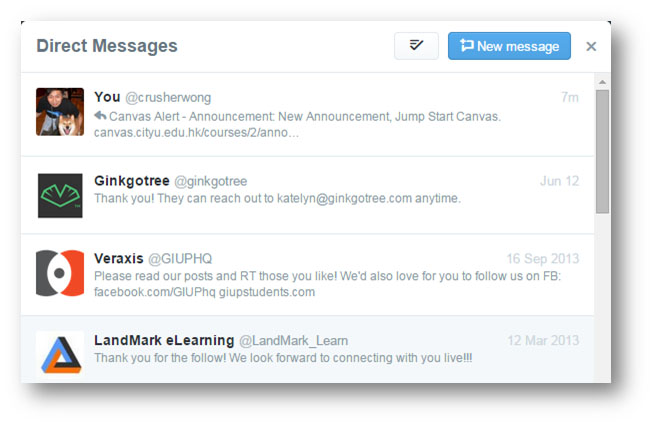
Figure 3: Canvas Alert on Twitter
Self-Directed Learning
Empowering students to take charge of their own learning, the LMS must allow them to initiate certain activities. Now, students can have a higher degree of control over their learning, rather than just to follow the task laid down by the course instructors, by creating their own study groups with a set of tools inside their Canvas course sites. Just visit “Discussions” or “People > Groups” for more information. The blue button will lead you through the steps. To distinguish self-directed learning activities from assessment tasks, Canvas only allows group assignments based on teacher created groups. Hence, colleagues must create the groups with manually assigned, randomly assigned or self-assigned members for group assignment submissions.
Empowering students to take charge of their own learning, the LMS must allow them to initiate certain activities. Now, students can have a higher degree of control over their learning, rather than just to follow the task laid down by the course instructors, by creating their own study groups with a set of tools inside their Canvas course sites. Just visit “Discussions” or “People > Groups” for more information. The blue button will lead you through the steps. To distinguish self-directed learning activities from assessment tasks, Canvas only allows group assignments based on teacher created groups. Hence, colleagues must create the groups with manually assigned, randomly assigned or self-assigned members for group assignment submissions.
Course Archive
You may always wonder why courses from previous years cannot be found in Blackboard. The fact is Blackboard's disk space is limited and it is costly to expand the SAN storage. In contrast, course sites can be retained for at least three years, and hopefully four years soon, in Canvas once better usage projection is available after a full-year operation. This brings good news for a typical undergraduate student who can retrieve all attended courses during his/her studies in CityU. Teaching staff can also benefit from the archive to facilitate the reuse of teaching materials. Just click “View All or Customize” under “Courses” or “Courses & Groups” and you will find “Past Enrollments” with your previous courses on Canvas.
Of course, it is impossible to write about all the features in Canvas. Search the “Canvas Guides” at http://guides.instructure.com/ for an effective exploration. On the other hand, CityU specific information is available at http://www.22kk77.xyz/elearn. Have fun practicing e-learning online with Canvas!