Client VHD Implementation of Express Terminals
Concept – The Trend towards virtualization
The main enabling technology for cloud computing is virtualization. Virtualization abstracts the physical infrastructure, which is the most rigid component to compile, and makes it available as a soft component that is easy to use and manage. By doing so, virtualization provides the swiftness required to speed up IT operations, and reduces cost by enabling infrastructure with high availability. On the other hand, virtual computing automates the process through which the user can provision computer resources on-demand. By minimizing administration involvement, automation speeds up the provisioning process and reduces the possibility of human errors. For more information, please refer to our article on “Moving Towards Client Virtualization” (Ref: Network Computing Issue 71 - March 2012).
Existing area of solutions
The existing Express Terminals, which are end-point desktop PC clients, consist of both low-end and high-end hardware terminals with hard disk drive as the traditional system boot-up device. Every update exercise on OS patches and minor software alteration to be made on such device needs to be scheduled on a regular basis. As mentioned above, the burden on IT administration could be relieved and improved with the introduction of Virtual Hosted Desktop (VHD), a form of client virtualization. This is because the physical local disk storage medium has been replaced by using the PXE-booti technique that delivers through the network a pre-defined single instance of operating system (OS) image from a remote network server to the Random Access Memory (RAM) of the end-point clients. The part of RAM which holds a part of or the whole OS image then serves as a local virtual system disk of the end-point client.
VHD configuration – Dynamics behind the concept
The driving force behind the system we used is the Citrix Provisioning Services (PVS) which is one of the solutions to distribute a single instance master OS image to multiple end-point clients such as our desktop Express Terminals. The journey begins with an end point client PC without a physical hard drive booting from PXE proceduresii which results in a part of or the whole OS image being loaded into RAM and the remaining parts, if any, would be stored on the virtual disk either locally or on the Citrix provisioning server. This master OS image could be securely streamed to the predefined multi-teamed clients where needed. The following is a sample site diagram of the Provisioning Server Farm:
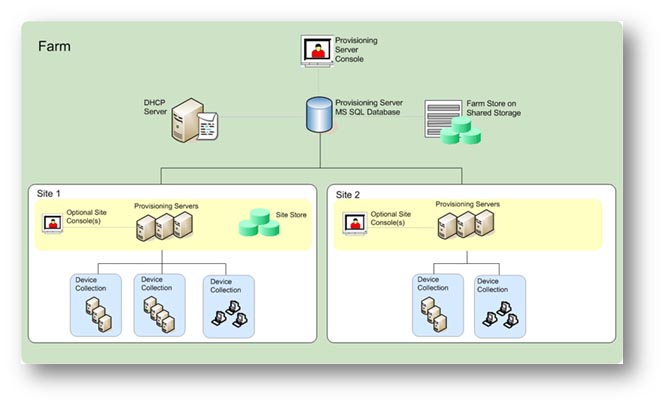
In this solution, the Citrix PVS store acts as a repository for VHD files used by the end point clients during boot-up process. Multi-teamed clients divided by geographic location can be grouped to receive a particular master OS image so as to provide a specific set of services. To alter the services provided, the teamed clients’ entire environment could simply be configured to pull down another master OS image, and then to reboot to cause the newly designated OS image being loaded onto the teamed clients. On the economic domain, the service improvement and deployment have been made easier and more cost effective by adopting this solution for the right mix of end-point clients (i.e. either full featured or low-end PC end-points) in the same pool (as opposed to requiring all PCs in the same pool must be of a single PC model running the same OS image).
In our phase one implementation, the first batch of teamed clients is mainly located in the common area on 4th Floor of Academic 1 (AC1) where a total of 30 terminals are currently in service. We will plan to extend the teamed clients to the other buildings as the next expansion phase.
The Future Possibility – Desktop-as-a-Service?
The Fundamental to this concept of Desktop-as-a-Service (DaaSiii) is the subscriber/provider relationship such that all IT services and infrastructure are being paid for as an operational expense rather than direct capital expense of the company. Imagine the Computing Services Centre (CSC) could assemble a series of Desktop packages (from low-end to high-end machine models) and make them available to departments for measuring IT resource expenses. While the IT expenditure has been made, the CSC can dynamically assemble virtual Desktop packages (including the operating systems, applications, and user personalization settings) on a per user basis through clients’ on-demand provisioning. From the service provider’s prospective, this enables development in vast scale and efficient management for offering Windows-based desktops and applications towards a multi-tenant solution.
The Next Step
We will build on our experience and exploit Virtual Desktop Infrastructure (VDI) for improving space efficiency by provisioning of learning software via virtual desktop in teaching studios and BYOD.
i A network control environment introduced by Intel – http://www.wikipedia.org/wiki/Preboot_Execution_Environment
ii We are using the Proxy DHCP protocol to establish the connection between PXE clients & DHCP server.
iii DaaS – part of Citrix CSP solution - http://www.citrix.com/solutions/desktop-as-a-service/overview.html