Windows 8 - The Unified Experience at First Glimpse
|
|
Windows RT
|
Windows 8
|
Windows 8 Pro
|
Windows 8 Enterprise
|
|
Availability
|
Pre-installed on devices
|
Home customers
|
Business customers
|
Volume License customers
|
|
Runs on x86 processor
|
Runs on ARM processor only
|
ü
|
ü
|
ü
|
|
Can join a Windows Domain?
|
|
|
ü
|
ü
|
|
Can be managed by Group Policy?
|
|
|
ü
|
ü
|
|
Windows To Go
|
|
|
|
ü
|
|
Hyper-V
|
|
|
ü
|
ü
|
|
Windows Media Player
|
|
ü
|
ü
|
ü
|
|
Windows Media Center
|
|
|
Buy add-on from Microsoft
|
|
|
Runs programs you used with previous versions of Windows
|
|
ü
|
ü
|
ü
|
|
Microsoft Office apps bundled with OS
|
ü
|
|
|
|
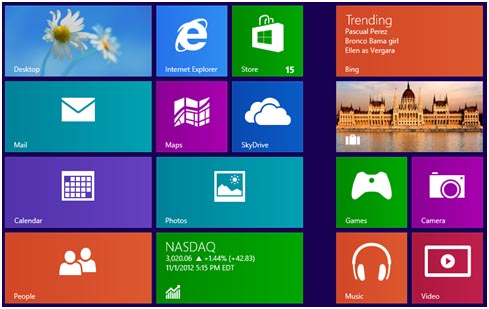
A new and redesigned user interface is optimized for touchscreens as well as mice and keyboards. Multi-touch as well as gesture recognitions are supported on touchscreens. It will be the first screen shown at startup. It replaces the Start menu of previous versions of Windows. Users can open apps, websites, contacts, and folders on the Start Screen, or just glance at the tiles of the Start Screen to get the latest news, real-time updates, and info.
2. Windows Store
A tile called “Store” can be found on the Start Screen. Users can get into the Windows Store by pressing the tile. A variety of apps divided into categories can be purchased and installed through the Windows Store. Users can also apply apps updates through the Windows Store. A number is displayed on the tile to indicate the number of updates that are available for apps.
3. Microsoft Account Integration
Microsoft account can be used to sign in the PC running Windows 8. When a user signs in with a Microsoft account, the PC is connected to the cloud, and many of the settings, preferences, and apps associated with the account can "follow" the user between different PCs especially the settings of Hotmail and SkyDrive.
4. Windows To Go
Windows To Go is a new feature for enterprise users of Windows 8 that enables users to boot a full version of Windows from external USB drives on host PCs. It is designed for enterprise usage and targets scenarios such as continuance of operations, contractors, managed free seating, travelling workers, and work from home and so on.
5. Internet Explorer 10
Windows 8 ships with Internet Explorer 10, which can run as either a desktop program or as an app with a new full-screen interface optimized for use on touchscreens. Internet Explorer 10 also contains an integrated version of Flash Player, which will be available in full on the desktop, and in a limited form in the app.
6. Hyper-V
Microsoft has replaced its previous virtualization solution with a more powerful, scalable, and capable solution called Hyper-V in Windows 8. Hyper-V is based on its server-based virtualization technologies, giving a more compatible and integrated solution to users. XP Mode based on the old Windows Virtual PC technology is no longer supported in Windows 8.
